Showing posts with label digital mysteries. Show all posts

Friday, 5 August 2016

FREE iPad app - Theo in Ancient Greece

To celebrate today's official launch of the Rio 2016 Olympics, we have made our 'Digital Mysteries: Theo in Ancient Greece' app absolutely free! This activity is aimed at 7-11 year olds and has a strand about the history of the olympics and the role that main character, Theo, played in it.

It's free to download until 21st August 2016 - the date of the closing ceremony. If you'd like more information on the iPad app, please click here.

To download, click here or search 'Digital Mysteries Theo' on the App Store! We hope you enjoy using it, and if you have any questions or comments, please email info@reflectivethinking.com.

The beginning of the grouping stage in the app.


Tuesday, 15 March 2016

Spring is here!

Spring is upon us. Pastel colours adorn the dummies in clothes shops, the (very) odd day of sunshine promising us that we will be warm one day, and hundreds of different chocolate eggs (more than ever this year) in every shop you enter. This means one thing…Easter is nearly here!


For most people I know, this is always a pleasant time. Children definitely enjoy Easter…among my strongest childhood school memories are harvest festivals and Easter fairs. Whether students need to begin learning about the harder/more serious and complex side of Easter, it's a good time to do it now.. Another element that can make it more engaging and easier to build discussion, is them learning together, in true collaboration.

We have three ways:

  1. Get students to create their own activity about Easter or Spring.

    There are so many things we can talk about and learn at this time of year, whether that's the religious story behind Easter or the blossoming of so many kinds of life in Spring. It's also something that students tend to enjoy. So how about if they were to create an activity for their classmates to use/solve/do? This works well in two ways. It has a Project Based Learning strand. Students must plan, research and structure their own project – a task - but it also has the brilliant edge of helping all students see the topic from different perspectives. This multi faceted technique means they should learn, but also remember, more.

    We suggest Thinking Kit – activities tend to consist of one main open question or objective, then lots of ‘snippets’ – bits of information made up of facts, quotes, research and/or images. The creation side can be done on any device. Once the activity is created, you are given a short code. You enter that in the FREE app and the task downloads instantly.

    The Thinking Kit Creator has a 1 month FREE trial (no card details required) and the Thinking Kit App is free.

  2. Create an engaging activity yourself.

    You could create an activity with Thinking Kit too, then just tell the class your code, and they can instantly start using it on their iPads.

  3. Pre-prepared activity.
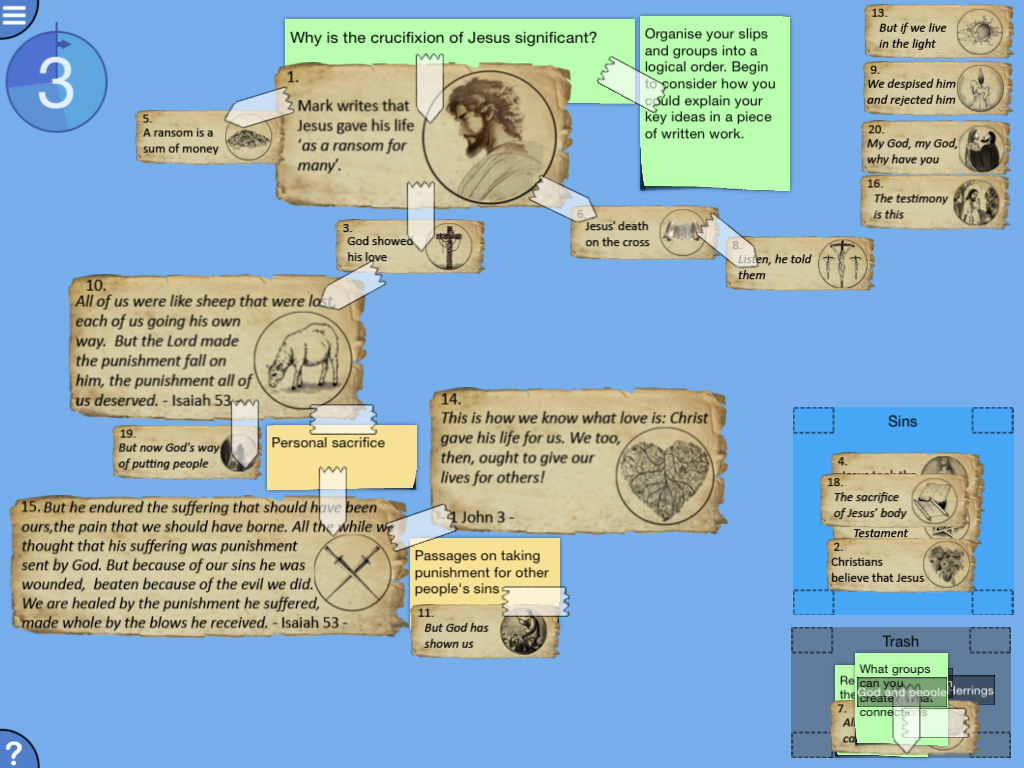
    A screenshot from Digital Mysteries: Crucifixion of Jesus

    Our dedicated app, Digital Mysteries: Crucifixion of Jesus is now down to price tier 1 (79p, 99c, AU $1.49) from price tier 2 (£1.49/US $1.99/AU $2.99). Students ideally work in pairs but can work alone or in small groups too. They're given little illustrated slips on screen, ranging from passages from the bible and Christian beliefs of the crucifixion of Jesus. They have to read and work through these together in order to answer, ‘Why is the crucifixion of Jesus significant?’

    The app is designed for collaboration so there are plenty of discussion triggers and ways of expressing opinion, e.g. the group, sticky tape and note tools. It can be used with 11-16 year olds as it has three difficulty levels – as the difficulty level goes up, more slips are given, which may introduce complexity and a new strand to consider.

    For more information, please search ‘Digital Mysteries Jesus’ on the App Store or click here.

Thursday, 19 November 2015

Taking a mystery from India to England and back again

We haven’t had a blog post like this before but it’s something that was lovely to see at the time, and still is. Our very first blog post on Thinking Collaboration was actually about this day, but Ahmed focused more on one of the key takeaways from the day: How to make students’ collaborative strengths and weaknesses visible, and why.

It was a day that Digital Mysteries was used in academic research with Newcastle University (Ahmed is a researcher there). This time, it enabled students age 9-10 from Shanklea Primary School in Cramlington, Northumberland, in the North East of England to learn more about students in India, and vice versa.

This was a time before we had Digital Mysteries iPad apps too, so it was all through the Windows version. The teacher, Mrs Harris, had never used the software before and neither had the students, but after a quick ‘how to’, they were ready to go…

Students were asked to:

CREATE a mystery (a task involving lots of scalable, movable slips of information and/or images) about life at Shanklea Primary School, and what it’s like to live in England

BECAUSE children in India were to ‘solve’ it later that week. They learned all about school and life in England, via the students' creations

AND the children in India had created a mystery on THEIR school and life in India, which the Shanklea class ‘solved’

This opened up two different perspectives for the children and was a real learning curve. They had to summarise information about themselves, their school and their area and think about what would be most important/interesting/engaging for the children in India to learn about. Then, they also learned from the other point of view – ‘the learner’ rather than ‘the creator’ when they used the mystery made for them. It was brilliant to watch as the students thought about what they should include, then even better to hear their reactions when interacting with those in India.

Mrs Harris and her class created a blog post on the project, which has some great pictures of the students using the software, things they drew specifically to include in their tasks and a selection of comments from the students on what they thought.

We’ve included a few screenshots of quotes from some students on their class blog here:


Our pre-made Digital Mysteries are available on the App Store now. A selection are completely free.

Coming soon: A new tool to create similar activities for iPads, the Thinking Kit. If you’d like to be one of the first to get a free one month trial for the creator side (app will be free), email info@reflectivethinking.com with ‘Shanklea TK’ as your subject.

Digital Mysteries for Windows has a free one month trial. Download now.
Thanks, Natalie

Thursday, 12 November 2015

Happy 1st birthday to Digital Mysteries

This week (Friday) marks the first birthday of Digital Mysteries apps for iPads! It was on the 13th of November 2014 that our very first iPad app came out. This is one of the various free ‘samples’ we have on the store now and has three full ‘mysteries’ for 7-11 year olds.

Now, we have 38 apps on the App Store; 17 for 7-11 year olds and 21 for 11-16 year olds. Topics range from Ancient Greece to computer networking (with an exciting island) to volcanic eruptions to Romeo & Juliet. We have made some of our apps FREE and others half-price to celebrate (until 24th November)!

These apps have now been downloaded in 69 different countries. We love that teachers all over the world are helping students develop key skills of collaborative learning and higher level thinking AT THE SAME TIME as they cover the topics many schools have to learn about.


If you haven’t heard of Digital Mysteries before, the full range can be viewed on our website or in the App Store on our Developer page.

In summary though, they are apps designed to be used by pairs or small groups. Most mysteries ask students one main open question then give them lots of different digestible snippets of illustrated information on the screen. They must then work together to make sense of that information, link different ideas together and discuss how they can answer that question. All the actions are recorded too, so students and teachers can go through a short Reflection Stage at the end and/or get a PDF report.


They were developed following years of research by Dr. Ahmed Kharrufa, who researches the impact technology can have on various elements of learning. If you’re interested in the papers on such topics, please go to our research section.

To celebrate our birthday, we have decided to make 6 of our apps completely free and another 6 of our most popular apps almost half-price! This price drop will last for 12 days: one for every month that Digital Mysteries have been on the App Store. We hope you enjoy using them and would love to hear from you once you’ve explored the mysteries with your students.

These apps (except Amy) are usually £1.49 UK, $1.99 US, $2.99 AU.

Apps for 7-11 year olds now half price:
Apps for 11-16 year olds now half price:
Apps for 7-11 year olds now free:
Apps for 11-16 year olds now free:

If pre-existing content isn’t your thing, we are almost ready to release a new tool ‘Thinking Kit’ which lets you create YOUR OWN mystery-like activities for iPads. If you want to hear more about this, comment ‘TK’ on our form and we’ll let you know when you can have a one month FREE trial of the Thinking Kit Creator. The apps to use these created activities on will be free.

Thanks,
Natalie

Friday, 16 October 2015

Helping primary age children learn about Remembrance Day

It’s that time of year… waking up to darker mornings, thick coats and scarves coming out plus pumpkins (and snowmen) adorning the shelves of the shops. Half term is nearly here, and before long, poppies will be all around us – many will wear them, whether at home, school or on the television.

Students will even sell poppies themselves to raise money. Remembrance Day is on the horizon, but how much do young people know about the real story behind it?

With the topic fresh in people’s minds, it makes it an ideal topic to teach students about ‘events beyond living memory that are significant nationally or globally’ or relatable ‘significant historical events, people and places in their own locality’. What better way to teach history than a topic that is bound to have a direct link to many of the students in the room – whether that’s in their current day or their grandparents’?

Our classic mystery 'Remembrance' by an excellent teacher has been made into a FREE iPad app (usually £1.49) - search 'KS2 Remembrance' on the App Store to download or click here. It is a relevant, story-based task consisting of 24 illustrated slips which pairs or threes work through together. It has the key dates of the world wars and hints at how they link to our lives now, but all through the eyes of a young person like them, Sarah.


Get this iPad app FREE - click here or search 'KS2 Remembrance' on the App Store

Students read through the slips, create groups and give them names (to drag and drop slips into), add sticky tape to link similar slips together or use the note tool to add thoughts they have along the way. They do all of this, with the goal of answering "Why did Sarah attend the Remembrance Service?"

The process involved in this free app, and the fact that there is no one right answer, lends itself to helping students develop key skills of collaboration, higher level thinking and retention of information.

For more information, please go to the information page on our website OR download the app now.

Edited re-post from November 2014 (last year's was about our Windows version)

Thursday, 17 September 2015

8 ways to mark World Tourism Day in school

World Tourism Day 2015 is on Sunday 27th September: providing you with a topic to use around this time. It is an opportunity to highlight the key messages the event promotes in an enjoyable way for students.

‘1 billion tourists, 1 billion opportunities’


The day aims to emphasise the importance of tourism and its value across the world. It also seeks to address challenges outlined in United Nations Millennium Development Goals (MDGs).

No matter what ages you work with, this is such a versatile topic. It opens up a whole host of fun ideas for the classroom.

When I was reminded by a tweet this morning that the day was coming up, I thought I'd have a think about it and came up with 8 ways to mark it in school.

  1. Virtual tourism: Skype or Google Earth

    It's an excellent way to help your students learn about other countries and cultures plus share their own experience too. There are some brilliant ideas out there on the most creative ways to do this.

    Skype Education is easy to navigate around and helps you find the best match for you and your class. I’ve seen so many teachers share things about the sessions they’ve had – so if you haven’t already, give it a try! Mystery Skype is a big branch of this. Invented by teachers, the general idea is that one class has to guess the location of the other class, all through Skype!

    There’s also some great ideas on using Google Earth to explore the world too – whether you have desktops or tablets, there’s a way to get your students virtually touring!

  2. Organise a trip somewhere

    It's almost definitely something you've done before, and probably more hassle than a virtual trip, but it's so worth it. Seeing your students enlightened by the prospect - then reality - of visiting somewhere they’ve never been or experienced before, is wonderful.

    It can be a different continent (wow!), a different country, a different town or even a local site they’ve never been; whatever it is, starting planning now brings it that bit closer.

  3.  Have a ‘try another culture’ day

    How this works depend on a few things – your role, how big your school or class is or even the enthusiasm of colleagues. It can be a schoolwide event, or just your class, but this can be a great way for students to experience other foods, languages, customs and character.

    It could mean simply bringing in a few different types of snack-type food and your class guessing which country it originates from, or it could be students bringing in things themselves. Get a class on Skype from the country you focus on, or perhaps invite in a speaker from there!

  4. Get students sharing their own experiences of tourism

    They could write a review, newspaper article, blog post (if you have a school blog) or even design a leaflet for tourists. This doesn’t mean they need to have been somewhere far away or expensive – it could be where your school is, it could be on a place they visited at the weekend or where they went on a school trip.

    You could ask them to do it about somewhere they want to go, then they’ll have to do lots of research!

  5. Run a SOLE session

    If you haven’t heard about Self Organised Learning Environments (SOLEs), read about them here. In short, they are “when educators and/or parents encourage kids to work in groups that they form, and are free to change, to answer big, open questions by using the internet” (SOLE toolkit).

    How about making the big question something tourism related? An example could be “What is the best country to visit in the world?", "What defines a tourist?" or anything you think.

  6. Have a look on Global Dimension’s website

    Browse through the ‘tourism’ educational activities for lesson plans, resources and teacher packs.

  7. Try one of our resources
    Package and all inclusive holidays are becoming very popular in recent years
    A slip from the Glenda mystery

    We have a range of collaborative learning activities. If you’d like a PDF ‘mystery’ on why Glenda, someone running a beachside hotel, may be cooking breakfast for the last time (more details here), comment ‘NTD Glenda’ at Let Us Know and I’ll email it to you.

    If you’d prefer to try an iPad app, take a look at our Geography mysteries (see our website) and comment ‘NTD’ at Let Us Know followed by the name of the app you want to try, and I’ll email you a free code to download it!

  8. Get involved on social media

    Take a look at the social media pages of World Tourism Day and share your views.

If you have any ideas or have planned something already, please do comment or let us know on Twitter (@refthinking).

Thanks,

Natalie

Friday, 4 September 2015

How can you engage students in literacy this month?

Tuesday 8th September marks International Literacy Day. If you didn’t know already, this is a day recognised and supported across the world, every year.

"Approximately 775 million people- 64% of whom are women- are functionally illiterate. In other words, they lack the basic reading and writing skills to manage daily living and employment tasks."
World Literacy

This is one of the reasons this day is held; to raise awareness of such shocking figures and help in whatever way we can to reduce this figure. There are several ways to get involved.

Recommended by World Literacy, you could host an event in school. Not only will this complement the brilliant work already happening there, but it can help promote the wider cause. This gives the opportunity for parents to be more involved, possibly other members of the students’ families, and it could be made into an event for a cluster of schools in your area or even a community thing. It may also be worth contacting your local newspaper, radio or TV station too.

Some suggestions by International Literacy Day are:

  • Readathon

    Inspire students with a reading challenge. Students may have to read as many books as they can in a week, or try something from a different genre perhaps. Parents and families could sponsor them!

  • Writing competitions

    Encourage your class/school/community of young people to bring out their creativity and imagination. It could be on a specific theme, they may have to include certain words or it can be open.

  • Open mic night

    This can link to the above point – students could share their work. An alternative would be a mixture. Teachers and students may be invited to read out what they’ve written, act out a play/show they have drafted or perhaps simply read out their favourite piece, whether that’s a poem, a page of a book or something else.

  • Host a speaker

    The focus here could be on how literacy has had an impact on their lives. If this isn’t possible, a Skype conversation with them and your class/school could work wonders.

  • Book sale/exchange

    This one is quite self-explanatory. World Literacy suggest funds of this (or the sponsored readathon or open mic night) could go towards building a library for children in developing nations.

There are plenty more ideas on the website. If you have any of your own, or if you’re already celebrating in school, leave us a comment!

What about us?

We have made three of our collaborative learning iPad apps completely FREE for September. These can be used to engage students in reading and writing, and we hope you enjoy them...

Under 8s: Amy

This app asks the students  “Why didn’t Amy go to school today?” On screen, the children (in pairs) are given 15 illustrated slips which each have a bit of information on them. These snippets are a lot easier to read than a bulk of text. They must work together to think of names for groups that the slips can go into and then they write a short answer at the end.

Download on the App Store: bit.ly/DMAmySchool
Get more information on our website: bit.ly/RTAmySchool

8-11s: Cup and ring marks

For slightly older students, this app looks at Neolithic and Bronze Age traditions and the mystery of cup and ring marks. It breaks up a good amount of information into easily-digestible pieces for students to work through together. As the apps are designed for working on in pairs, there’s valuable support from each other as they read the snippets and think about the topic.

Download on the App Store: bit.ly/DMCupRing
Get more information on our website: bit.ly/RTCupRing

11-14: WW1 Trenches

This is a brilliant tool to encourage writing. Students are immersed in the story of fictional war veteran Tommy Murphy. They’re told how his diary, from his days in the World War One trenches, has been found . There are two objectives the teacher can choose from. One is to ask students to discuss/write an answer to whether the physical or mental dangers in the trenches were more serious. The other is to put them in a reporter’s shoes: “Your editor has asked you to look through the diary and some history books to write an article about the trenches.”

Download on the App Store: bit.ly/DMWW1T
Get more information on our website: bit.ly/RTWW1

Summary

As you know, literacy is such an important skill. You’re already helping make a difference. If you are hosting an event, remember to register on online! This doesn’t commit you to anything, but ensures you get a pack including things like a certificate for winning students and a sponsorship form.

Note

You can also get an extra free trial to our new creation tool for iPads – it can be used by teachers and students. Click here to find out more.

Monday, 17 August 2015

5 ways to make the most out of Digital Mysteries

Since Digital Mysteries for iPad launched in November 2014, we’ve been developing more and more apps and now have 37 live on the App Store! We are regularly uploading more so keep an eye out.

Much to our excitement, downloads have come from far and wide – the UK of course, where we are based, but also USA, Australia, Canada, China and far too many countries to list!

After speaking to many teachers who use the mysteries, there can be differences in how and why they are used. Some teachers prefer to download the app then have a quick run through and then use it with their class. Others prefer to really explore everything the app has to offer, try different things and customise it, then, and only then, do they use it with the students.

So to make the most of what our Digital Mysteries apps have to offer, we’ve created this ‘Top 5’ list of things you might not know are available:
  1. Dedicated collaboration: Although our descriptions discuss how the apps are designed for working in pairs/small groups, as well as many of our tweets and emails, this is not always the way people use them. This is probably because when a teacher downloads an app, they are on their own and each individual app has a specific focus, e.g. Shakespeare, so they focus on the content, ease of use, the process and what students could possibly learn. While working individually on Digital Mysteries is absolutely fine, and can bring lots of benefits, it brings a multitude of extra benefits when worked on in pairs (or a three). It is excellent for developing collaboration skills, discussion, communication and higher level thinking. The apps are made so that more than one touch is allowed at a time, so students work together on ONE iPad – an added bonus being that you actually only need half the amount of iPads (see ‘Doubling the availability of your iPads’).

    How to: When you’ve tapped ‘Begin New Mystery Session’, toggle the number of users there is using the arrows. Names are entered and they have separate buttons to press in-session. They must tap on their own name to agree certain things throughout the session, e.g. that they’ve read an introduction, agree with the name choice for a group or that they’ve decided on their answer.


  2. Reports: When students have finished a session and wrote their answer in, a PDF report is automatically generated. Upon completion, you aren’t automatically taken to the PDF, as it may not be the right time to look at it, or it may be something the teacher would print/share rather than the students.

    How to: To view a session report, just go to View Reports in the main menu and tap on the one you want to see. From there, you can print, email or share.


  3. Differentiation: Most of our apps have three difficulty levels to them. It varies from app to app what difference this makes, but it usually means the higher the difficulty level, the more slips of information are provided to students (which may have abstract or more advanced content on them). There are also sometimes differences in the hints given to students when they have difficulty moving on from the Grouping Stage or Sequencing Stage.

    How to: To change your difficulty level, go to Settings from the main menu and toggle between levels in the top right hand corner.


  4. Number of stages: If you didn’t know already, most Digital Mysteries apps have three stages in ‘solving’ them. The default is usually 1. Reading, 2. Grouping and 3. Sequencing (followed by entering an answer and playback). However, if you would rather students have access to all of the tools from the beginning and have the process unsegmented (before answer and playback), you can. If you like the idea of students simply reading all the slips, then moving to the stage where they create and group them all, choose Two Stage.

    How to: To set a different amount of stages, just go to Settings, and toggle between the amount of stages in the top left corner. (One Stage is all tools at once, with no segmentation of reading, grouping then sequencing. Two Stage is reading then grouping).


  5. Session playback: Schools we’ve spoken to about Digital Mysteries tend to love this feature. Students also find it engaging too; it is brilliant to watch as they show other groups what they’ve been doing. Session playback, also known as the Reflection Stage, occurs automatically after students write in their answer. This means that most people know about it. You could also:
  • Bookmark: Sit with each group and discuss some key moments with students. Within the actual session, students can ‘bookmark’ certain points in time - these are then pinpointed on the playback timeline so you/they can easily go back to them.
  • Improve: Ask students to think about what they would do differently as they reflect; it’s not just like a video playback, so they/you can pause it and play around with what’s on the screen!
  • Quick glance: Have a look at our guide, ‘Interpreting What’s on the Screen’ – it’s a rundown of what the different icons mean at a glance.
  • Go back to it next week: While the Reflection Stage automatically occurs immediately after students enter an answer, you can also go to ‘Session Playback’ from the main menu at any time afterwards, and just tap on the one you want to view. This is great to recap and see how much students remembered.
  • Reflect as a class: Try connecting one of the iPads to a projector and reflecting on the session as a class (Using the Session Playback)


Thanks very much for reading this post on Digital Mysteries – there are many ways to use it (both, as a teacher and a student). We could have added various other things but this is a short summary of those which you may have missed. We would love to know how you use Digital Mysteries or if you have any tips for other users. Comment here or email info@reflectivethinking.com

There is also a video here which runs through a typical session, and you can visit our resources page and FAQ for more things not mentioned here, or contact us if you have a question.

Thursday, 6 August 2015

Externalization: Making thinking visible

During collaborative group work, some of the main processes in the acquisition of knowledge are the construction, transmission, and comprehension of explanations. These activities result when trying to explain some concepts or when resolving conflicts about certain understandings/beliefs. This is because during such activities, some assumptions that are usually implicit, have to be made explicit. Furthermore, during the process, missing knowledge is identified and is subsequently filled by deductive and/or inductive learning mechanisms. These activities do not normally occur during individual learning.

Accordingly, technologies (or even technology-free activities) that are designed to foster collaborative learning, need to focus on increasing the probability of such useful group activities to occur. The more students' thinking is made visible to others (visually or verbally), the more likely it is that it will be followed by discussions aiming at explanations/conflict resolution.

This process of making thinking visible is usually termed externalization of thinking. Encouraging externalization can involve making very simple changes to the activity design. For example, instead of asking students to just put items in groups, ask them to specifically name these groups and write down the name of the group. Instead of asking the students to find a relation between items, ask them to be explicit about the type of the relation: whether it is a causal, temporal, or special relation for example. Asking for this bit of extra information means that students have to be more explicit about their thinking. The more explicit they are, the more chances that there will be a need for providing an explanation, or solving a disagreement in the group.

A screenshot from a mystery - students have named their groups, e.g. 'Attractions of the New World'.

Friday, 24 July 2015

International Day of Friendship

On 30th July each year, the International Day of Friendship is marked. Proclaimed only four years ago in 2011 by the UN General Assembly, the idea is that by developing friendships with each other, different communities, countries and even continents, bridges can be built and peace can come as a result.

"On this International Day of Friendship, let us cultivate warm ties that strengthen our common humanity and promote the well-being of the human family."

UN Secretary-General Ban Ki-moon

All across the world, this has been celebrated. Individuals, communities and small to big organisations have spread the word. Just a quick search on Twitter shows there’s a lot going on. While many children develop friendships from a very early age, keep some, and make more, others do struggle. This may just be from time to time – facing temporary difficulties which ‘sort themselves out’, for example – but for some, they may go through year after year of finding it hard to make friends. There are many reasons for why this could be, but for this very reason, it’s essential to talk about it. This could be with someone they trust in particular, for example a parent or teacher, but as well as this, how about with their peers?

In many countries, the curriculum provides some guidance/stipulation that teachers must cover bullying for example, but not all. Plus, the way this has to be done is not usually enforced. If there was a simple way to trigger discussions in this area, with the help of some easy-to-use technology, would you try it? Even as just a starting point, then things go from there. This is why, to celebrate the International Day of Friendship, we have made our English/Citizenship/PSHE app/mystery story free for two weeks (until 7th August). While it can be used with any students you think suitable, the target age range is around 6-7 years old.

In pairs, or threes, students sit around one iPad and read 15 slips of information (interactively, on the iPad). They must start making sense of these together, helping each other to group them and work out why a young girl called Amy didn’t go to school this particular day.

It helps students:
  • to recognise how their behaviour affects other people, to care about other people’s feelings and to try to see things from their points of view
  • to listen to other people, and play and work cooperatively
  • to understand that there are different types of teasing and bullying, that bullying is wrong, and how to get help to deal with bullying
If you want to try it, visit the App Store here now, search 'Digital Mysteries Amy' on the App Store or read a bit more about it on our website.

More information on the day from the UN’s website

“The International Day of Friendship was proclaimed in 2011 by the UN General Assembly with the idea that friendship between peoples, countries, cultures and individuals can inspire peace efforts and build bridges between communities. The resolution (A/RES/65/275) places particular emphasis on involving young people, as future leaders, in community activities that include different cultures and promote international understanding and respect for diversity.

The Day is also intended to support the goals and objectives of the Declaration and Programme of Action on a Culture of Peace and the International Decade for a Culture of Peace and Non-Violence for the Children of the World (2001-2010).

To mark the International Day of Friendship the UN encourages governments, international organizations and civil society groups to hold events, activities and initiatives that contribute to the efforts of the international community towards promoting a dialogue among civilizations, solidarity, mutual understanding and reconciliation.”

Tuesday, 14 July 2015

Exploring the explorers

Although many around the world have already started the summer holidays and some will soon be going back after their winter break, for most schools in England, this week is the final week of term!

To celebrate this, we've made a lot of our iPad apps either half-price or completely free, temporarily.

An example of one of our apps is an exciting history mystery about a Spanish explorer who set off to the New World. It is now £0.79 in the UK, $0.99 in the US and $1.29 in Australia. It's aimed at 11-14 year olds.

In pairs (small groups or alone are options too), students work through this topic together to discuss the motivations behind Pablo's venture.

They are given lots of illustrated slips/cards of information and asked to sort through them. To do this, they go through different stages (a structure based on Moseley et al.'s (2005) integrated model for understanding thinking and learning. Firstly, they gather information and read the slips, then they move towards building understanding by classifying the informaion and identifying relations. In the sequencing stage, they then focus on reasoning and understanding.

To download 'Digital Mysteries: Spanish Exploration and Conquest', half-price until 21st July, click here.

If you would like more information on Digital Mysteries, please go to www.reflectivethinking.com/digitalmysteries-ipad.

A screenshot of the grouping stage

Monday, 6 July 2015

World Population Day

This Saturday (11th July) marks World Population Day. This year’s theme is Vulnerable Populations in Emergencies.

Recommended in 1989 by the Governing Council of the United Nations Development Programme, the 11th of July now holds this important day every year. While the overall cause remains the same, the focus is tweaked to raise awareness of certain subjects.

From the UNFPA (United Nations Population Fund)'s website, this eye-catching image has been designed:


For more information on this year’s occasion, please go to www.unfpa.org/events/world-population-day.

We have made one of our apps for 14-16 year olds free the whole of July for this day. It is on the population of China and the fluencies, issues and themes around it. To download, go to its page on the App Store here or search 'population mystery' in the App Store search bar. Using the app is a collaborative experience and designed for two people to work on one iPad at the same time. Discussion is encouraged throughout the process.

Tuesday, 30 June 2015

SOLE with a twist

After planning it before Christmas, we were very much looking forward to visiting Greenfield Arts’ SOLE Room 13, again. They do amazing work with students of different ages, and are one of the schools chosen to host a SOLE (Self Organised Learning Environment) area. When last there, we observed a ‘SOLE Grannies’ session (more info on these here), but today was going to be a little different. We were running a session of Digital Mysteries within the SOLE room – with some features of SOLE, but not quite the same.

Mrs Pattison, two colleagues and her year five class walked along the road from Byerley Park Primary School. They often make visits to Greenfields for SOLE sessions, and do really well. If you don't know SOLEs very well, these are “created when educators and/or parents encourage kids to work in groups that they form, and are free to change, to answer big, open questions by using the internet” (SOLE toolkit). The origins lie in Professor Sugata Mitra’s Ted-Prize winning talk here. To find out more, go to School in the Cloud.

Students were provided with mini iPads, enough for half of the class. It is deliberate that they only have one between two, as mysteries are designed to be worked on together and they can both interact with the screen at the same time. The whole process is designed to encourage discussion throughout – so they’re always engaging with each other.

Pip the Dog – 5 minute intro

Since students have not used our app before, we started with a little introduction with Digital Mysteries: Pip the Dog, a fairly simple PSHE/Citizenship app. It didn’t need much explaining but we went through; how to resize a slip, how to progress from one stage to the next and what each stage asks from you.

After about 5 minutes we asked if everyone was ready to begin the full session, and there was lots of shouts of ‘Yes!’, it was time to move on.

Theo in Ancient Greece

Since the students had covered Ancient Greece in another term, we chose Digital Mysteries: Theo in Ancient Greece as the task for this session. This was good to re-jog their memories at the same time as collaborating, thinking, learning new things and reflecting.

The main question in this app is ‘What is Theo most proud of about Ancient Greece?’

Set up
  • Mostly pairs, one three, then as the time went on, a few working on their own.
  • Medium difficulty (each app has Easy, Medium and Hard settings – this usually determines how many slips and hints the group are given). In this case, Hard would have brought in an extra topic to consider – democracy.
  • Two stages – reading, then grouping the slips, followed by typing in their answer and then the Reflection Stage. By default, there would usually be a Sequencing Stage in between grouping and answering, but we eased them in for today, especially because we wanted more time than usual to reflect at the end.
Activity

While it wasn’t a traditional SOLE session as such, we were in SOLE Room 13. It’s a flexible working space, with brilliant decor and different places to sit. In traditional SOLEs, the students are free to sit wherever, move around and have full control over their learning. One of the walls is clear glass – so it is a small way of observing what is going on.

What we did, was integrate some elements of a SOLE session. We stayed within the room for a little while until we knew the students were settled into the task (as well as for taking some pictures).

Reading Stage
  • Students got to grips with this straight away: there are a few different ways of making the icon sized slips bigger so you can read everything on them. Many tended to double tap and a few used the ‘pinch and zoom’ gesture.
  • The majority of students read the slips in numerical order – this helps them be organised as they know which they have read. The information on the slips is deliberately not in correlation chronologically with the numbers of them, so this works fine.
  • Some read the slips together and some pairs had a pattern of having one student re-size the slip then the other reading it while the other listened.
Grouping Stage

Students are asked to create at least three named groups to sort the slips into. There was a good mixture when having a look at the end. One pair did only have two (relevant, not relevant), but even this helped see how the students thought (that's why we call it Brains on the Tablet).

Reflection Stage

As mentioned, there would usually be a Sequencing Stage, but due to the nature of the session and the time restrictions, the students then went straight to typing in their answer. The Reflection Stage then followed. For the groups that got to this point, it was so good to see the enthusiasm and pride on many of their faces.


The two in the video finished before everyone else, and the benefit of this set up in Room 13 was how freely they could move around and show other pairs bits of their process. This was excellent to see. One group, when asked how many groups they had made and what they were called, started talking about theirs, and used the Reflection Stage to emphasise their point. This ‘Stimulated Recall’ was interesting.

Back to us…

Katy Milne (Director of Arts and Creativity) and Mrs Pattison very kindly asked the students lots of questions at the end. These involved thinking about the setup, the content of the app, the usage of the app, what they’d learned and whether they’d do it again.

Some questions asked:

How many groups did you create?

One pair created six different groups/categories, which was interesting, and several others: four or five. As mentioned, there was one pair who created two groups.

What did you learn in this session that you didn’t know before?

A few students talked about the main character Theo. An answer included ‘We learned that Theo has a statue of him’. We then made it clear that Theo was a fictional character who was created in that time frame to help them learn about what it would be like to be someone at this time.

Another answer was ‘that builders used columns called Doric, Ionic and Corinthian to hold up roofs’ and that ‘the British Museum in London is built in a classical Greek style’ (interesting that this student used the iPad (on the app’s Reflection Stage) to point to this fact.

What was Theo most proud of about Ancient Greece? (The main question)

There was many answers but the majority said that it's Theo and his father being in the Olympics. An addition was that one of his favourite foods is olives and ‘because he won the Olympics, he got a prize of an olive crown, so he would have been proud of that’ – the connecting of two separate pieces of information was good to see. A different answer was that Theo would have been most proud of his uncle’s building work. On the Hard level of this mystery, additional slips about democracy would have been added – this could have brought in a different slant.

What did you think of how you were grouped together? Do you prefer how you usually work in a SOLE session, in bigger groups, or were you pleased with working in pairs?

Following on from the success we’ve seen in the bigger groups before, it was surprising to note that the students who spoke up, really found benefit in working in pairs:

“When you’re in pairs, you just listen.”

“I like it in little groups more, because you concentrate better.”

When Katy then asked if they felt free to move around (a big benefit of SOLE), one students said they did when they were finished: ‘Well they didn’t really get it, so me and Ryan sat and helped them’.

If you could think of a way to improve the app/mystery, what would you suggest?

It can of course be difficult for students to put their hand up and say something they feel may upset someone, but we tried to encourage them as much as possible, because feedback can only help us improve. One student did say it would be good if there was some way you could get rid of any notes and sticky tapes that you didn’t need any more/you’d done by accident – there is in actual fact, a ‘Trash’ group where you drag and drop stuff you don’t need. So although you can’t get rid of it entirely (the idea is that all thoughts/notes/actions are there if needed), you can remove it from main view and concentrate on the bigger picture.

Would you use Digital Mysteries apps again?

This was met with many enthusiastic exclaims of ‘yes’ and ‘definitely’, and when asked if they thought they could do a fresh mystery without any ‘instructions’ next time, they were very confident. A few highlights:

‘I thought that it was a bit different to any other game. In a good way.’
‘It was new.’
‘I liked it because I never knew you could do, like, this type of stuff on it.’
‘It was easy to use.’

Recap

It was a brilliant afternoon. We want to say a big thank you to Katy who organised the session, as well as James Brady for ensuring that all of the tech was running smoothly for the students.

Also a big thank you to Mrs Pattison and her colleagues for bringing the students in, asking questions and being supportive of the task. Of course, another thank you to the Byerley Park year five class who came in. They were a pleasure to work with, came up with some great ideas and were very polite at the end, coming up to us to say thank you.

At some point in the future, it will be great to do it again!

To read Greenfield Arts' blog post on this session, click here.
To try Digital Mysteries, go to our Developer's Page on the App Store.

Wednesday, 10 June 2015

Storytelling through mathematics

Today, I came across Maths Storytelling Day (25th September, celebrated annually). Although the day isn't for a while yet, it got me thinking.

When pondering my own education, I remember maths being one of the subjects which incorporated stories fairly regularly. A favourite being that of making a robot move around and follow your instructions, which in today's education, could probably slide under computing. I always thought that it was perhaps my teacher's style, but upon reflection, and with a particular day dedicated to it, it has become apparent that the reason we do maths through storytelling is because it works!

There's various pieces online about this (found with a quick search), but I'll be looking more into this in future. The Guardian and NRICH are two particularly good ones. To quote the latter, "Children are born with an ability to make sense of the world through play and storytelling. By creating narratives, they act out concepts and ideas that confuse them or that they find fascinating. Examining the world in this way they are able to explore and relate to the variety of topics and subjects that the world throws at them."

Many of our iPad apps follow a story, but our maths ones are particularly engaging. They really do make you want to solve something, e.g. work out who really did kill King Ted. You want to find out what has or has not happened, and the way to do this is to do the maths! We have made all three of our apps FREE for a limited time, except King Ted, which is always free.

Students work in pairs or threes around one iPad. The app gives students lots of digital slips of illustrated information then one open question - they must work together to make sense of this information in order to answer it.They can create and name groups, stick things together and lay the slips out. As well as developing various mathematics skills, the apps also help with collaboration, problem-solving and higher level thinking.

All three apps target a slightly different age range but depending on ability level, what methods the children know/will be learning soon, they may suit younger or older students:

King Ted - FREE - Search 'Digital Mysteries King' on the App Store or click here
Main question: Who killed King Ted?
Age range: 8-9 year olds
Topics covered: Mental methods addition, subtraction, multiplication, division, comparing, calculations
Screenshot from Trev the Triff

Trev the Triff - FREE for limited time, usually £1.49 - Search 'Digital Mysteries Trev' on the App Store or click here
Main question: Should Trev hire the new machine or stick with the old one?
Age range: 9-10 year olds
Topics covered: Addition, subtraction, multiplication, division, multi-step problem, averages

Captain Quint - FREE until 16th June 2015, usually £1.49 - Search 'Digital Mysteries Captain' on the App Store or click here
Main question: Did Captain Quint and his crew make it around the world in 30 days?
Age range: 10-11 year olds
Topics covered: Addition, subtraction, multiplication, division, fractions, percentages, statistics, measurement

Many thanks,

Natalie

Wednesday, 27 May 2015

Would your students love to see their own ideas made into an iPad app?

The fusion of our experience in collaborative learning research, developing iPad apps and an interest in Project Based Learning in the last couple of years, led to our creative competition, Our Mystery.

As a very quick summary, it offers UK years five, six, seven and eight the chance to come up with their own ‘Digital Mystery’. There can be as little or as much ICT as they like involved, as we provide a template form in PDF or Word and ask for hand-drawn or photographed images to accompany it.

We wanted to help slot the opportunity in with existing school plans rather than require extra time, so the mystery can be on a topic students have covered or are soon to cover.

For an entry pack for your students, just go to www.reflectivethinking.com/ourmystery. The deadline for entries is in a few weeks so giving the task to students after their half-term holiday slots in perfectly.

Friday, 8 May 2015

Can technology help encourage more young people to get involved in politics?

In our previous blog post, we shared with you that we created a dedicated task for 11-14 year olds to discuss the UK 2015 general election.

Over the past few weeks, it has been brilliant to hear of teachers using the app/task across the country.

On the morning of the election day itself, the team went to the largest school in Newcastle, Kenton, to work with year 8 students and see whether the task had made any difference. It was incredible to see the transformation from before to after - one student said they had 'no interest in politics', but afterwards was asking lots of great questions about the different parties. They wanted to find out more.

In a couple of minutes, this video explores the session and has an interview with some of the students who took part:


Some quotes from the students:
  • "If I did have the opportunity to vote, I think I would have a better idea of who I would vote for."
  • "I also think I've got a better idea, because when it's on the news, it's often just clustered together, what people said. It doesn't give you the full insight of what the different parties want to do."
  • "You want to know which (parties) are good for you, so with your friends, you know you can have a conversation with them to know which one is better."
  • "I think it (the Digital Mystery) gives you a better understanding of stuff and you can know what's good and what's bad and I think it would be good to introduce it at other elections."

One of our brilliant pieces of feedback from Twitter:
Thanks to everyone for supporting this task/iPad app, including everyone following our social media updates, those at BBC Radio, the Northern Echo, Bdaily, Schools North East and North Tyneside Learning Trust.

If you've got something to share about 'Digital Mysteries: UK Election 2015', let us know!

Tuesday, 24 March 2015

Great artists in history - Art curriculum

Click here to download the app
30th March marks Vincent van Gogh's birthday. He was born on 30th March 1853, which means he was born (as of this year: 2016), 163 years ago. His work and life story makes a big impact all these years later, and is on the curriculum of schools across the world.

We have worked with a teacher to create an engaging iPad app dedicated to Vincent and his contribution to the history of art. In celebration of what would have been his birthday, we have dropped the price of this to the lowest: 79p (UK), 99c (US) and $1.49 (AU).

Digital Mysteries: Vincent van Gogh is a unique app which allows pairs of 7-11 year olds to work simultaneously on one iPad with a task mapped to the art/English curriculum. They can also do the task alone if preferred.

Users are given illustrated slips of information which they read, organise into groups and lay out across the screen. These are all about the interesting story of Vincent van Gogh’s life, and the controversy surrounding how he came to lose an ear, to introduce students to his – and fellow artist Paul Gauguin’s – work. It can be used to contribute to the requirement to teach pupils about great artists in history.

A screenshot of Digital Mysteries: Vincent van Gogh
The 18 slips include letters between Vincent and his brother, a diagnosis of Vincent’s health by Doctor Rey, a newspaper report and statements of many of the people involved. While these are central to the story itself, the mystery also brings in many of Vincent’s paintings which can be viewed very clearly in the largest slip size. There is also a self-portrait by Paul Gauguin included too.

Click here to see on the App Store.

It is hoped that the students will be engaged in the dramatic story behind the famous artist while at the same time be able to learn about his style and whether/how it was different to others. The mystery could be used to support the development of group discussion and interaction, as well as encourage students in their development of generic thinking skills.

Once students have finished and came up with their own answer to ‘Why did Vincent lose his ear?’ they can generate a printable PDF report which outlines the session; students involved, their notes, groups and answer, as well as colourful screenshots of each stage. They can also go to a Reflection Stage in which they can playback the process and discuss it as a group, with their teacher or even as a class.

The task might serve as a spring board to further research comparing and contrasting the differing approaches and subject matters of Vincent van Gogh and Paul Gauguin.

To find out more and see the full list of learning outcomes, click here or email info@reflectivethinking.com.